Suica is primarily used in Japan, especially for public transport, but its utility has expanded.
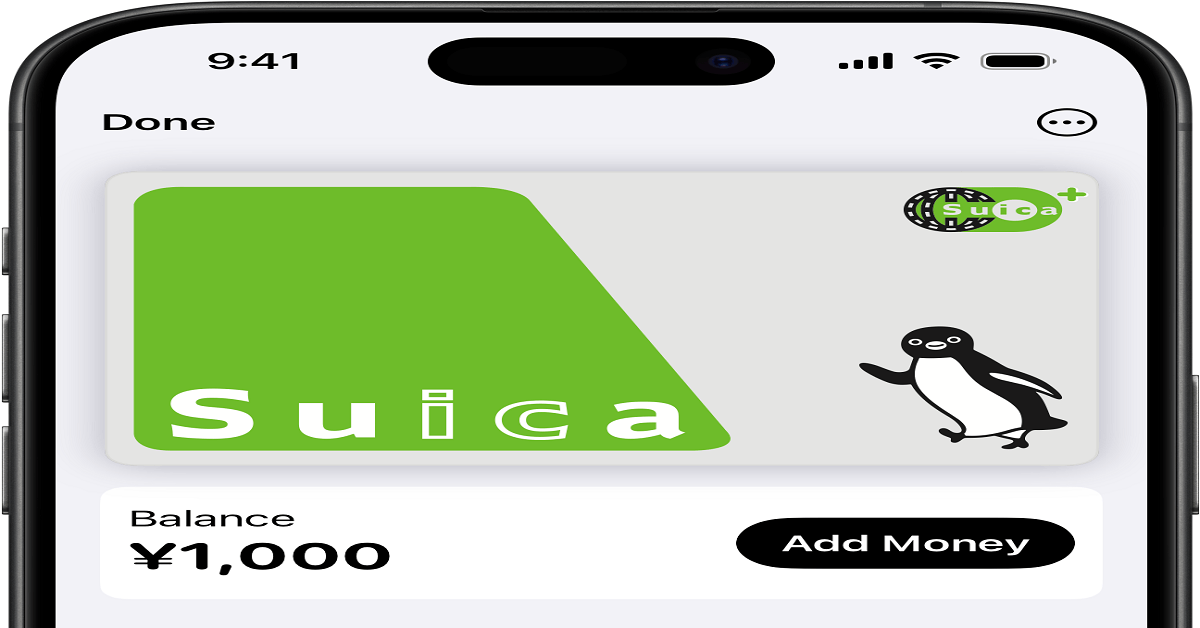
One of the Suica app's most beneficial features is the ability to link a credit card for easy transactions using Apple Wallet and Apple Pay.

This article will guide you through downloading the app and applying for a credit card for seamless, cashless payments.
JR East and the Suica Card
JR East, or East Japan Railway Company, is one of Japan’s largest railway operators.
It is responsible for the vast majority of train services in Japan's eastern regions, including the Greater Tokyo Area.
Established in 1987 as part of the privatization of the Japan National Railways, JR East serves millions of passengers daily.
Introduction to the Suica Card
The Suica card is a contactless smart card issued by JR East, designed primarily for use in the region's public transportation system.
Suica stands for “Super Urban Intelligent Card,” and it was introduced in 2001 to improve the convenience of paying for train rides and bus fares.
Key functions include:
- Public Transportation: Suica is primarily used to pay for train and bus rides in Tokyo and surrounding areas. Simply tap the card at the ticket gates to enter and exit stations. The fare is automatically deducted based on your start and end stations.
- Retail Purchases: It is accepted at numerous retail outlets, convenience stores, vending machines, and restaurants. It is widely used for microtransactions in places like cafes, convenience stores, and shops at train stations.
- Interoperability: Although is issued by JR East, it is compatible with other transit systems in Japan. The card can be used on transport networks in various regions through a system called IC Card Interoperability (such as PASMO in Tokyo, ICOCA in Kansai, and others). This makes it convenient for travelers who need to use different transit systems.
Features and Benefits:
- Convenience: The card's biggest advantage is its ease of use. Instead of buying paper tickets or handling cash every time you need to travel, you simply tap your Suica card to pass through gates. For people living in or visiting Japan, this eliminates the hassle of carrying around cash or paper tickets.
- Reloadable: Suica cards are reloadable, meaning you can top up your balance with cash at JR East stations or use online payment methods via the Suica app. This flexibility makes it easy to ensure your card is always ready for use.
- Multiple Payment Methods: In addition to physical cards, users can now download the Suica app on their smartphones, enabling them to use a virtual Suica card. This makes it even easier for people to manage their transportation payments without carrying a physical card. Additionally, linking a credit card to the app allows users to load funds seamlessly, adding another level of convenience.
- Contactless: As a contactless smart card, it eliminates the need to handle cash or wait in line at ticket vending machines. You simply tap your card, and you’re on your way. This feature extends beyond transport to include shopping and other small transactions.
How to Download the Suica App
Follow these simple steps to download the app:
- Visit the App Store or Google Play: First, go to the App Store on an iOS device or the Google Play Store on an Android device.
- Download and Install: Once you find the official Suica app by JR East, tap the download button to install the app on your smartphone. The app is free to download and relatively lightweight, so it won’t take up much storage space.
- Open the App: After installation, open the app. Upon launching it for the first time, you will be asked to grant certain permissions, such as allowing the app to access your location for transport-related features.
Registering For a Suica Card
Now that the app is downloaded, the next step is to create an account.
To ensure that your card is properly linked to your personal details, follow these steps:
- Tap 'Suica Issue': Once inside the app, tap the "Suica Issue" option. This will initiate the process of creating your virtual card, which can be used just like the physical card.
- Select 'My Suica': You will then be prompted to choose between a new card or a personalized one. Select the “My Suica” option, which allows you to link your name and email address to the virtual card.
- Register Your Details: Enter your personal information, including your full name, email address, and a password. The app will require this information to create an account for your card.
- Verify Your Information: Some versions of the app may ask you to verify your email address. You will receive a confirmation email containing a verification code. Enter this code into the app to proceed.
Adding the Suica Card to Your Apple Wallet
For users with iPhones, the Suica card can be easily added to the Apple Wallet app.
Once there, you can use it to ride public transport and purchase in stores using Apple Pay.
- Open the Wallet app
- Tap the Add button
- Tap Transit Card
- Choose the card you want to add
- Choose an amount to add to the card
- Follow the steps on the screen to confirm your purchase
Linking a Credit Card to Your Suica Account
One of the main benefits of the Suica app is the ability to link your credit card, making it convenient to load funds and make payments.
Here’s how you can link your credit card:
- Open the Wallet app
- Tap your Suica card (You can also tap a Credit or Prepaid Card)
- Tap Add Money
- Choose the amount you want to add and tap Add
- Select the credit card you want to use
- Confirm the transaction with Face ID or Touch ID
Contact Information
JR East Customer Service:
- Phone: +81 50-2016-4240
- Website:https://www.jreast.co.jp/e/
Conclusion
The Suica app is a convenient and efficient way to make payments for transportation and purchases.
By linking your credit card to the app, you can effortlessly load funds onto your virtual Suica card and use it anywhere Suica is accepted.
Whether you are traveling in Japan or making everyday purchases, the app offers a practical solution for managing your payments.
Disclaimer: This article is for informational purposes only. The processes described may vary slightly depending on your device, operating system, or version of the Suica app. Always use the official Suica app and contact the relevant customer support if you experience any issues.
Last updated on May 18th, 2026 at 04:03 pm